


You don’t need a huge video crew or an expensive production studio to make commercials people will actually pay for. In this article, I share how I made $100 in online income using AI, and how a company paid that money after I created a commercial for them.
But before I show you exactly how I did it, take a look at the commercial I created for the said company.
The AI Commercial Process
To make this commercial video happen, I requested product photos for their two fruit juice flavours, along with essential details like their logo, business location, and phone number:
- The next step was to find video inspiration for the concept I wanted to use, and I used a platform called Spectacle. After getting all the required information, I moved on to ChatGPT.
- I clicked on the “Create an Image” button, uploaded the product photos, and added my first prompt, instructing it to create a vibrant, refreshing commercial with the refined aesthetic of a premium beverage brand.
- And after a few minutes, ChatGPT created a storyboard featuring both juice flavours and all the key selling points I wanted to highlight.
- But sometimes you can get generic results that do not match how you like them, so if you are not happy with it, type Next and send. ChatGPT will regenerate a different one for you.
- Once you have the results you wanted, click on the image and download it.
Note: You can download the prompt I used here in case you want to practice with it yourself.
But remember to replace the product name, category variations, core benefit to communicate, and the target audience. Also, ensure you modify the visual style to how you want it.
How I Turn The Images into a Video
- To bring our commercial video to life, there are a couple of AI tools to help achieve that; in my case, I used Google Flow AI, but you can use other options like Kling or Seedance.
- However, Google Flow AI gives you 50 credits daily to practice. But for a professional job, I prefer you go with the premium version, which costs around $2 monthly for the first 3 months, from where I am coming from.
- Inside Google Flow AI, click on Create New Project.
- Now, head over to this section, click the plus sign, and tap on Upload media. Locate the storyboard ChatGPT helped you outline and click to upload.
- Once you upload the storyboard, click on Add to prompt.
- Ensure you are in “agent instruction” mode, paste in the animation prompt I have provided, and click on Submit.
- Wait a few minutes for the next instruction before you click on Approve. This helps you adjust your prompt to know whether you are getting the right result.
- Click Approve, and Google Flow will start the animation process for you.
- Once you finish with the animation, click on it and play through the video to see if the splash physics and product movement fit into the concept you wanted. Because in some cases, liquid animations take a tweak or two to get right.
The Editing Processes
- After the image generation and the animation process, you need to add a human touch. In some cases, you need to add a voiceover to the commercial you are working on.
- This varies from product to product. So in my case, I requested a voiceover script from the company; they provided it, and I recorded the entire thing myself to give both juice flavours that energetic, human feel.
- If you are working on a professional job, I recommend recording it yourself or finding someone on Fiverr or 15ghana to record a human voice that fits the project.
- Once you finish, import everything into any editing tool of your choice. In my case, I am using Adobe Premiere Pro; you can use CapCut, or if you are using a phone and you want those premium features on CapCut, you can go with Kwaicut.
- Once you import the project, place them on your editing timeline and add the recorded voiceover and sound effects; if possible, search for copyright-free commercial music and add it to make it look professional.
And that’s how I was able to come up with that commercial you watched earlier.
How I Got That $100 in Online Income Using Only AI
A few days after uploading my AI tutorial on my YouTube channel, I checked my email and saw something that caught my attention right away.
The subject line read, “Commercial Collaboration Inquiry.” At first, I honestly thought it was spam. But after reading it, I realised a real company wanted me to create an ad for them.
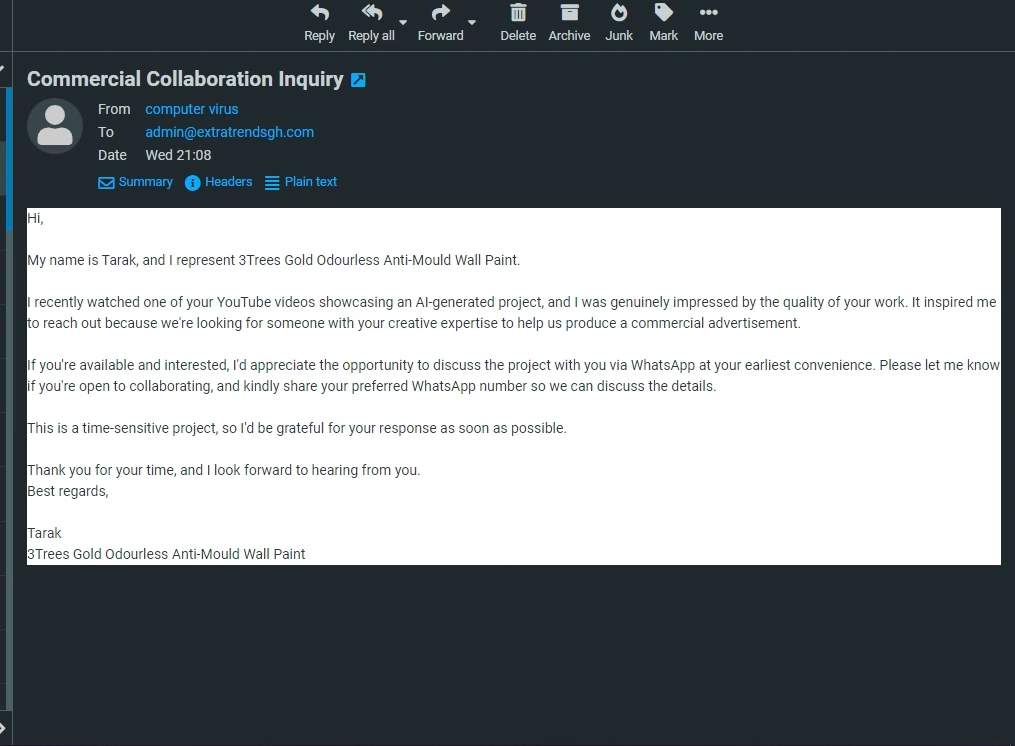
The product in question was two; one was paint, and the other was a beverage. However, the paint commercial is not yet done, and the company wouldn’t let me put out a halfway project.
Fast forward, we directed the chat to WhatsApp, where they told me that they produced paint and fruit juice flavours and needed a commercial.
Even though we negotiated, we went back and forth for a bit on the price I was charging them.
Because I didn’t have a rate card, this is my first time doing such a gig. So I based my number on the time it would take me and what felt fair for both sides, and we landed on $100.
However, I didn’t get the job done easily because I sent the first draft of the commercial to the person involved, and they weren’t fully happy.
I was concerned I had messed up my first paid project. They liked the idea, but they pointed out several things that didn’t feel right.
In some of the scenes, the colour contrast on the juice bottles felt slightly off, making them look unnatural, and the automated voice reading the script sounded robotic. So I re-rendered the visuals and did the entire voiceover myself to give it that authentic human touch.
And that’s how my final project was approved, and I finally got paid.
My Thoughts on My First Online Income Using AI
A hundred dollars might sound small on camera, but the bigger win is what it proves. Small businesses everywhere need content. They need ads, promos, and social media videos. Most of them don’t have a marketing team. Some of them don’t want to pay thousands for a video crew.
AI tools now let one person, working alone from their phone or laptop, deliver something that looks professional.
Disclaimer: This is not some get-rich-quick method. Maybe I was lucky someone found me through a video and hired me, but one thing I have learned is that:
Don’t just learn AI; show what you can create. I mean, upload sample commercials to YouTube, TikTok, LinkedIn, or Instagram.
Because small businesses need examples before they trust you, my client didn’t hire me because I said I knew AI. They hired me because they saw something I’d already made.
If a local business can pay real money for a fruit juice commercial made this way, imagine what’s possible once you start putting your own work out there.
Now, if you want to see that video that got me this gig, tap the next video on your screen right now. My name is Reggie, and I will see you next.
It depends on the project, your experience, and the client. My first paid project earned me $100, but experienced creators often charge significantly more.
For this project, I used ChatGPT, Google Flow AI, Adobe Premiere Pro, and royalty-free sound effects.
Basic editing skills help, but modern AI tools handle much of the visual creation. Editing is mainly used to combine the assets, add audio, and polish the final result.
Yes, but clients usually want proof of your work. Building a portfolio of sample commercials can improve your chances of landing your first project.