


Getting paid gigs on uTest as a beginner isn’t just about signing up and waiting for an invitation. There are four things on your profile that can make a big difference in the types of opportunities you’re eligible for.
I know because I tested these changes on a brand-new account and landed an $18 gig that took me about an hour to complete. And someone who followed the same approach landed a $20 gig.
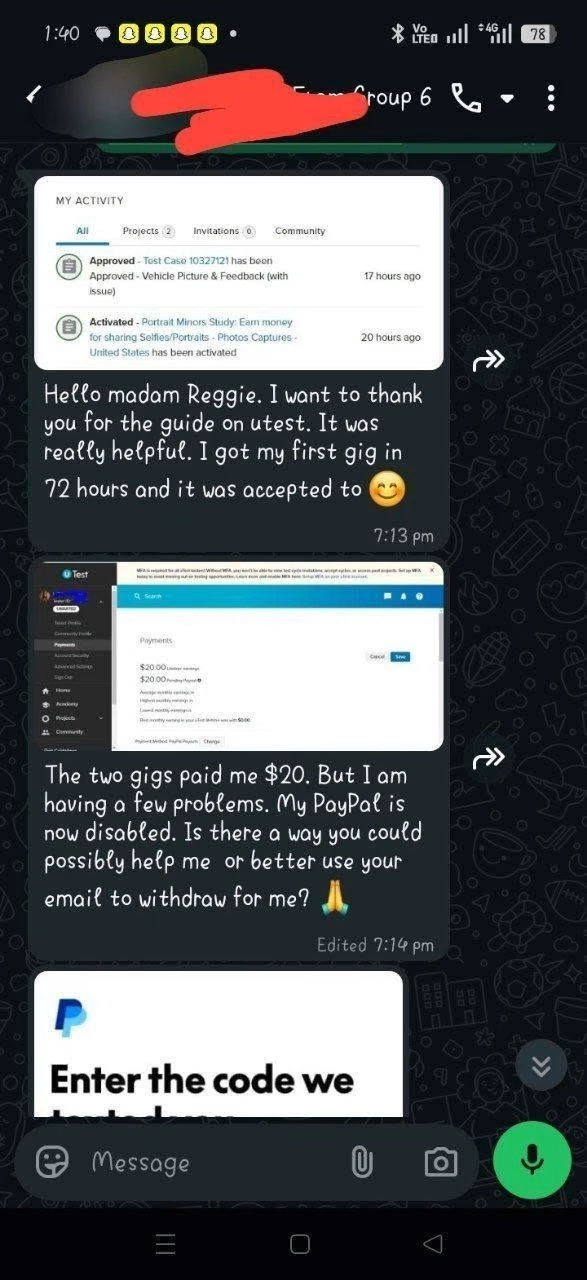
In this tutorial, I’ll walk you through all four changes, show you exactly what I did, and explain why each one matters, especially if you’re trying to land your first paid uTest gig.
Quick disclaimer: uTest opportunities vary by country, profile, and available projects. But everything I’m showing you is based on what I’ve personally tested.
4 Mistakes That Prevent Beginners From Getting Gigs on uTest
The platform doesn’t work like a job board. You don’t apply and get hired. The platform runs on an algorithm; it scans your profile and decides which test cycles you’re even eligible to see. Miss one setting, and you’re invisible to entire categories of paid work, bringing us to:
MISTAKE #1: Leaving MFA Disabled
One of the first mistakes beginners make after creating a uTest account is leaving MFA disabled. According to uTest, every tester on the platform must enable MFA to participate in any test cycles.
Without MFA, you can’t view details of all test cycles or accept invitations to new ones. The platform does this to protect testing data, ensure only you can access your account, and help you avoid missing testing opportunities.
So, if you haven’t enabled MFA on your profile, check your dashboard, set it up, and follow the guide to do it easily.
MISTAKE #2: An Incomplete or Generic Profile
Most beginners leave their uTest profile incomplete or poorly optimised. And this is where a lot of people get frustrated. They create the account, add their name and email, maybe add one device, and then basically sit there waiting for paid invitations.
But think about it from the customer’s perspective. If a company is looking for testers with a specific phone model, operating system, browser, or subscription, how is uTest supposed to know you match the requirement if your profile doesn’t include that information?
This shows that setting up your profile properly matters; to optimise it, click the navigation bar, tap Tester Profile, and make sure you complete the Personal tab first and set it up properly.
You also need to optimise the Device tab by entering or selecting the devices you have available.
Important Note:
Don’t lie just to qualify for a gig. If you don’t own an iPhone, don’t list one. If you don’t have Netflix, don’t pretend you do. You might qualify for the invitation, but once the test starts, you’ll be expected actually to use that device or service. And that can quickly become a problem.
Another section you need to pay attention to is the payment-testing information. According to uTest, updating your payment-testing information can increase your chances of being invited to payment-testing cycles.
So if you genuinely meet those requirements, don’t ignore that section.
The goal isn’t to make your profile look impressive. The goal is to make your profile accurate and useful to the system.
MISTAKE #3: Sitting Back and Waiting for Invites
What quietly kills most beginner accounts is treating uTest like a lottery. Sign up, then wait for gigs to land in your inbox. That’s not how active testers get gigs. uTest has a marketplace of open test cycles you can browse and apply to yourself.
So instead of waiting for an invitation. You need to go hunting; most invitations tend to go to accounts with a track record, and you don’t get a track record by sitting still. You can find available gigs by browsing the Project section under Project Boards.
Scroll through and make sure you find projects that fit your requirements, like your country, the device, or the service requirement, before clicking on Apply.
As a new profile, I recommend applying to smaller, unpaid, or low-paid cycles first if that’s what’s available. This builds cycle history, which helps the algorithm trust you with paid ones.
MISTAKE #4: Skipping uTest Academy
The uTest Academy is a free training program that teaches testers how the platform works and how to perform different types of testing. It also includes practice test cycles where you can actually apply what you’re learning.
Most Beginners I have mentored so far skip it because they see it like homework. But no, it actually works in your favour and helps you get the best results. To find that free uTest Academy course, click the menu bar, tap Academy, and it will bring up the course list and all the information you need to get started.
Completing courses earns you proficiency badges. Those badges show up on your profile and signal to project managers that you’re not a blank slate and that you understand the process before you’ve even touched a paid cycle.
My Advise
If you’ve signed up for uTest and you’re sitting there thinking, “Why am I not getting gigs?” Go back and check if:
- MFA is enabled on your account?
- Check if your profile is complete.
- Are the Devices and skills accurately listed?
- Also, complete the Academy course.
Then, when opportunities do appear, focus on doing good work, not just getting something submitted. That’s the difference between simply having a uTest account… and actually building yourself into a tester companies have a reason to invite back.
Is uTest Legit?
I tested this approach on a brand-new account and landed an $18 gig that took about an hour, and someone who followed the same process landed a $20 gig. Those are my results, not a promise that you’ll make the same amount.
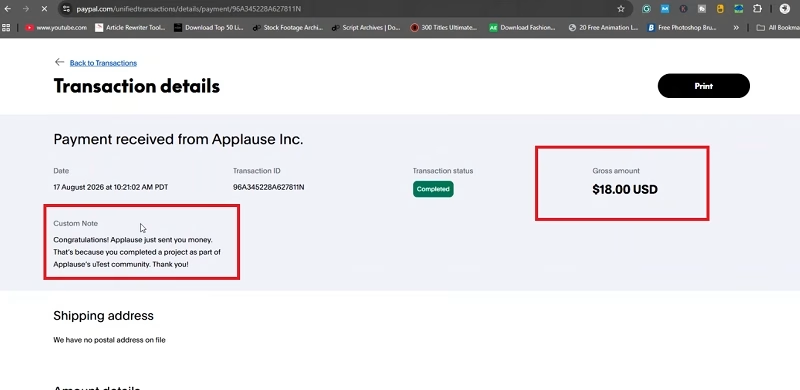
Your opportunities will depend on your location, profile, devices, skills, project availability, and work quality.
Conclusion
If you’re serious about giving uTest a proper shot, here’s what you should fix before sitting around waiting for an invitation. And if you want me to make a full beginner’s tutorial showing you how to complete your first uTest gig step-by-step, let me know in the comments.
Also, check the video below if you’re having trouble navigating the platform tabs. If this video helped you understand uTest a little better, subscribe because I have more practical videos on legitimate ways to make money online without pretending there’s some magical button that prints money on that channel.